How to create an Author page
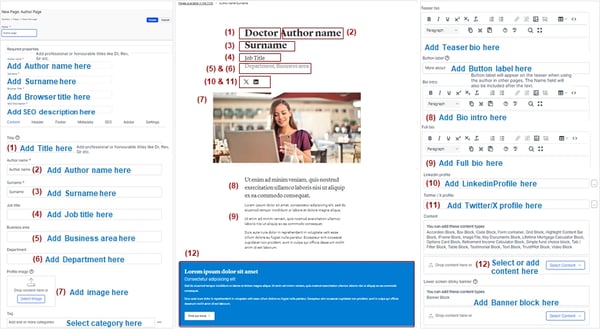
Author page - specific page type - example in the image below or here.
An Author page starts with the Tile - used to add the professional or honourable title of the author, like: Dr, Rev, Sir, etc.
On the 2nd and 3rd fields - these are mandatory - the Author's First name and Surname must be added
Job title, Business area and Department - will describe the details about the Author as per their names
Profile image - will appear at the top of the page, above the Name
Teaser Bio, Bio intro and Full Bio - Each of these areas has an associated Main Content area (which can be used to display the needed details about the Author); Teaser Bio also has associated a Button label - this will appear on the Teaser when using the author in other pages. The Name field will also be included after the text: "More about the Author"
LinkedIn or Twitter / X profile links can be added in the associated fields
Show author's content - checkbox: when enabled will list all the articles and content this person is attached to as an author
At the bottom of the page, in the Content area, related content/articles/images can be added; separated from the Bio info above.
Lower screen sticky banner - the content added in this area (only Banner block type) will appear and stick to the bottom of the page as customer scrolls.