
Bullets

Bullets and numbered lists can be used in any TinyMCE field

 

In this sub title text field they look like this:

  • Bullet 1
  • Bullet 2
  • Bullet 3
  1. Numbered list 1
  2. Numbered list 2
  3. Numbered list 3


In this standard text field they look like this:

  • Bullet 1
  • Bullet 2
  • Bullet 3
  1. Numbered list 1
  2. Numbered list 2
  3. Numbered list 3


You can also apply icons to bullet lists by highlighting each bullet line and selecting the required icon style from the format menu.
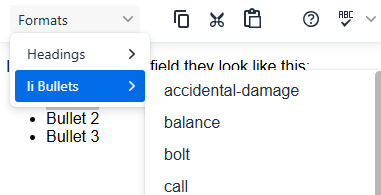
Bullet format menu


Available bullet icon styles:

  • accidental damage
  • balance
  • Bolt
  • Call
  • Care
  • cat
  • chart-bar
  • chat group
  • checkmark spot-fille
  • checkmark spot-outline
  • checkmark
  • checkmark - green
  • chevron-down-circle
  • chevron-up-circle
  • circle
  • cracked-mirror
  • cross
  • cross - red
  • dash
  • droplets
  • family
  • favourite-filled
  • favourite-outline
  • feature
  • fire
  • focus
  • funds
  • furniture
  • house
  • lump-sum
  • pet
  • running-tap
  • snowflake
  • square-outline
  • square
  • step-1
  • step-2
  • step-3
  • storm
  • television
  • water